Webhooks You Can Trust: Verifying MediaSFU Event Signatures in Node.js and Python

When a recording is ready, a room ends or someone joins, your app should know at once: to send the recording link, close the session in your database, or start the follow-up email. MediaSFU tells you with a webhook, an HTTPS POST to your server for every room event.
A webhook endpoint is a public URL, so anyone who finds it can post to it. This guide makes yours trust only MediaSFU, survive retries without doing the work twice, and stay fast. You get working code for Node.js and Python, and a way to test it all before a real room ever runs.
What MediaSFU sends
Every event is a POST with a JSON body like this:
{
  "id": "6f1c2a9e-4b7d-4f0a-9c3e-1d2b3c4d5e6f",
  "event": "recording.completed",
  "roomName": "s1a2b3c4",
  "timestamp": "2026-11-12T18:00:00.000Z",
  "data": {}
}
And these headers:
| Header | What it holds |
|---|---|
x-webhook-event | The event name, the same as event in the body |
x-webhook-id | The delivery's unique id, the same as id in the body |
x-webhook-timestamp | When the event happened (ISO 8601), the same as timestamp in the body |
x-webhook-signature | Lowercase hex HMAC-SHA256 of the exact body, signed with your webhook secret. Sent when a secret is set |
The events are room.created, room.ended, participant.joined, participant.left, recording.started, recording.paused, recording.resumed, recording.stopped, recording.processing, recording.completed, recording.failed, meeting.expired and translation.started.
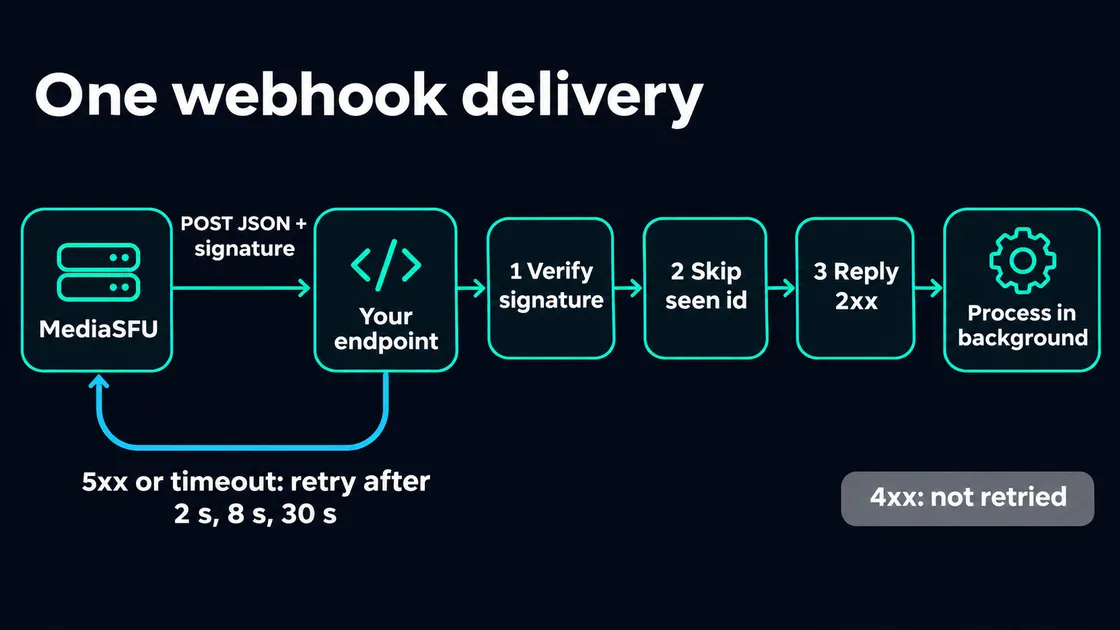
Your endpoint has three jobs, in this order: check the signature, skip events it has already handled, and reply quickly. The rest of this guide builds each one.
Step 1: Turn webhooks on
Make a secret first. Any long random string works (up to 256 characters):
openssl rand -hex 32Keep it in your server's environment as MEDIASFU_WEBHOOK_SECRET, never in a frontend.
Then set the URL and secret as your account default, so every room you create sends events:
curl -X POST "https://mediasfu.com/v1/eventssettings" \
  -H "Content-Type: application/json" \
  -H "Authorization: Bearer $MEDIASFU_API_USERNAME:$MEDIASFU_API_KEY" \
  -d "{\"action\":\"update\",\"webhookUrl\":\"https://your-app.example.com/hooks/mediasfu\",\"webhookSecret\":\"$MEDIASFU_WEBHOOK_SECRET\"}"
If you have never saved event settings, send "action":"create" with "type":"conference", "audioSetting":"allow" and "videoSetting":"allow" the first time.
You can also send events for a single room somewhere else: pass webhookUrl and webhookSecret when you create that room. Leave them out to use the account default, or send an empty string to switch webhooks off for that room.
The URL must be a public HTTPS hostname on the standard port: no custom port, no IP address, no username or password in the URL, and no #fragment. While you develop, a tunnel that gives you a public HTTPS address works well.
Step 2: Verify the signature
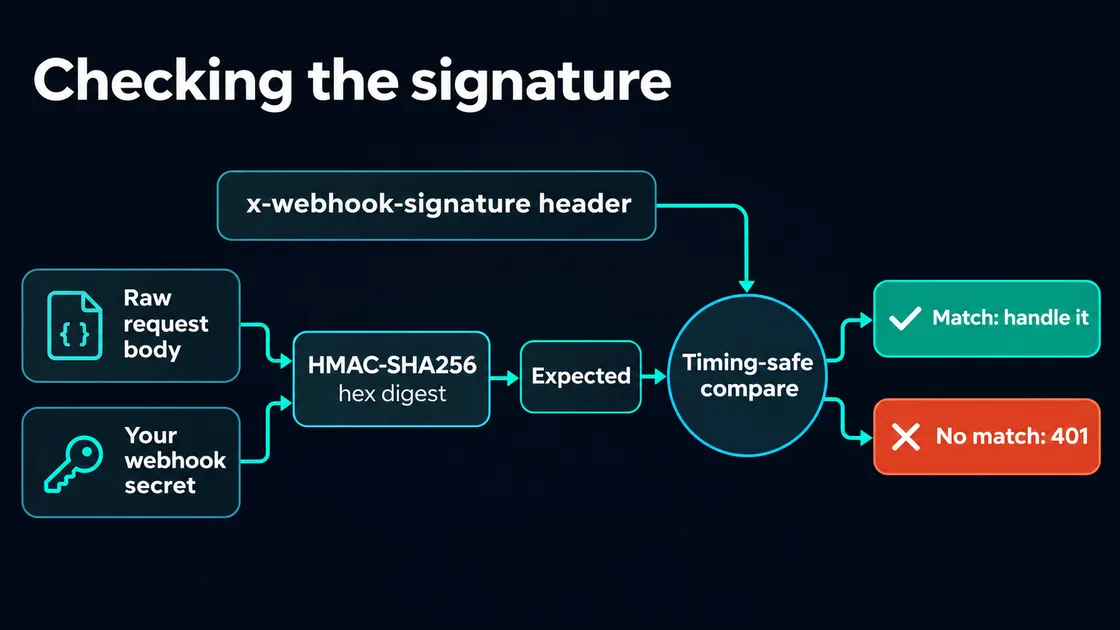
The one rule that matters: sign the raw bytes. MediaSFU signs the body exactly as it sent it. If your framework parses the JSON and you serialize it again, spacing or key order can change and the signature will not match.
Node.js (Express)
import crypto from 'node:crypto';
import express from 'express';

const app = express();
const SECRET = process.env.MEDIASFU_WEBHOOK_SECRET;

export function isValidSignature(rawBody, signature) {
  const expected = crypto.createHmac('sha256', SECRET).update(rawBody).digest('hex');
  const a = Buffer.from(String(signature || ''));
  const b = Buffer.from(expected);
  return a.length === b.length && crypto.timingSafeEqual(a, b);
}

// express.raw keeps the body as a Buffer for this route only.
app.post('/hooks/mediasfu', express.raw({ type: 'application/json' }), (req, res) => {
  if (!isValidSignature(req.body, req.get('x-webhook-signature'))) {
    return res.sendStatus(401);
  }
  const event = JSON.parse(req.body.toString('utf8'));
  res.sendStatus(204);
  // handle event (Step 3)
});

app.listen(3000);
timingSafeEqual takes the same time whether the first character or the last one differs, so an attacker can't guess the signature one character at a time. It throws if the lengths differ, which is why the length check comes first.
Python (FastAPI)
import hashlib
import hmac
import json
import os

from fastapi import FastAPI, Request, Response

app = FastAPI()
SECRET = os.environ["MEDIASFU_WEBHOOK_SECRET"].encode()


def is_valid_signature(raw_body: bytes, signature: str | None) -> bool:
    expected = hmac.new(SECRET, raw_body, hashlib.sha256).hexdigest()
    return hmac.compare_digest(expected.encode(), (signature or "").encode())


@app.post("/hooks/mediasfu")
async def mediasfu_hook(request: Request) -> Response:
    raw = await request.body()
    if not is_valid_signature(raw, request.headers.get("x-webhook-signature")):
        return Response(status_code=401)
    event = json.loads(raw)
    # handle event (Step 3)
    return Response(status_code=204)
Getting the raw body in other frameworks
| Framework | Raw body |
|---|---|
| Express | express.raw({ type: 'application/json' }) on the webhook route, registered before any global express.json() |
| Next.js (App Router) | const raw = await request.text() in the route handler, before any request.json() |
| Fastify | Register a content-type parser with parseAs: 'buffer' for the webhook route |
| Flask | request.get_data() |
| FastAPI or Starlette | await request.body() |
| Django | request.body |
Step 3: Reply fast, work later
MediaSFU waits up to 10 seconds for your reply. What it does next depends on your status code:
| Your reply | What MediaSFU does |
|---|---|
| 2xx | Done |
| 5xx, a timeout or a network error | Sends the same event again after 2 s, then 8 s, then 30 s |
| Anything else (401, 400, 404, a redirect) | Stops. The event is not sent again |
That gives you two habits:
- Reply first, then do the slow work. Put the event on a queue (BullMQ, SQS, Celery, a database table) or at least run it after the response. Fetching a recording, sending an email or calling an AI model should never hold the reply.
- Pick your status code on purpose. Return 401 for a bad signature, so a forged request is not retried. Return 503 only when you want the event again, for example when your database is down.
Step 4: Handle each event once
A retry sends exactly the same body, with the same id. If your server did the work but the reply was lost on the way back, the event arrives again. Record each id and skip the ones you have seen.
With Redis, one command does it, and the key expires on its own:
import { createClient } from 'redis';

const redis = createClient({ url: process.env.REDIS_URL });
await redis.connect();

// true the first time an id is seen, false after that (kept for a day)
async function firstTimeSeen(id) {
  return (await redis.set(`mediasfu:webhook:${id}`, '1', { NX: true, EX: 86400 })) === 'OK';
}
With SQL, a unique key does the same job:
CREATE TABLE mediasfu_webhook_events (
  id TEXT PRIMARY KEY,
  event TEXT NOT NULL,
  received_at TIMESTAMPTZ NOT NULL DEFAULT now()
);
-- INSERT ... ON CONFLICT (id) DO NOTHING: zero rows inserted means you have handled it already.
Step 5: Refuse old deliveries
The timestamp is inside the signed body, so nobody can change it without breaking the signature. Retries keep the original timestamp, and the last one arrives well under two minutes after the first. So you can safely refuse anything older than five minutes. That stops someone who captured a real delivery from replaying it later:
const MAX_AGE_MS = 5 * 60 * 1000;

function isFresh(event) {
  const sent = Date.parse(event.timestamp);
  return Number.isFinite(sent) && Math.abs(Date.now() - sent) < MAX_AGE_MS;
}
Keep your server's clock in sync (NTP) when you do this.
Put it together
Here is a complete Express endpoint with all four checks. When a recording is ready, it looks up the file through the API:
import crypto from 'node:crypto';
import express from 'express';
import { createClient } from 'redis';

const app = express();
const SECRET = process.env.MEDIASFU_WEBHOOK_SECRET;
const AUTH = `Bearer ${process.env.MEDIASFU_API_USERNAME}:${process.env.MEDIASFU_API_KEY}`;
const redis = createClient({ url: process.env.REDIS_URL });
await redis.connect();

const isValidSignature = (raw, signature) => {
  const expected = crypto.createHmac('sha256', SECRET).update(raw).digest('hex');
  const a = Buffer.from(String(signature || ''));
  const b = Buffer.from(expected);
  return a.length === b.length && crypto.timingSafeEqual(a, b);
};
const isFresh = (event) => Math.abs(Date.now() - Date.parse(event.timestamp)) < 5 * 60 * 1000;
const firstTimeSeen = async (id) =>
  (await redis.set(`mediasfu:webhook:${id}`, '1', { NX: true, EX: 86400 })) === 'OK';

async function handle(event) {
  if (event.event === 'recording.completed') {
    const url = `https://mediasfu.com/v1/recordings?action=get&name=${encodeURIComponent(event.roomName)}`;
    const res = await fetch(url, { headers: { Authorization: AUTH } });
    const { recordings } = await res.json();
    console.log('Recording ready:', recordings?.[0]?.url);
  }
  if (event.event === 'room.ended') console.log('Room ended:', event.roomName);
}

app.post('/hooks/mediasfu', express.raw({ type: 'application/json' }), async (req, res) => {
  if (!isValidSignature(req.body, req.get('x-webhook-signature'))) return res.sendStatus(401);
  let event;
  try { event = JSON.parse(req.body.toString('utf8')); } catch { return res.sendStatus(400); }
  if (!isFresh(event)) return res.sendStatus(400);
  if (!(await firstTimeSeen(event.id))) return res.sendStatus(204);

  res.sendStatus(204);
  handle(event).catch((err) => console.error('webhook handler failed', event.id, err));
});

app.listen(3000);
In production, swap handle(event).catch(...) for a job queue so a restart can't lose work in progress.
Test it before a real room runs
You can sign a test event yourself with the same secret and send it to your endpoint:
BODY="{\"id\":\"test-$(date +%s)\",\"event\":\"room.ended\",\"roomName\":\"s1a2b3c4\",\"timestamp\":\"$(date -u +%Y-%m-%dT%H:%M:%S.000Z)\",\"data\":{}}"
SIG=$(printf '%s' "$BODY" | openssl dgst -sha256 -hmac "$MEDIASFU_WEBHOOK_SECRET" | sed 's/^.* //')
curl -i -X POST "http://localhost:3000/hooks/mediasfu" \
  -H "Content-Type: application/json" \
  -H "x-webhook-event: room.ended" \
  -H "x-webhook-signature: $SIG" \
  --data-binary "$BODY"
Check four things:
- the request above gets a 204;
- the same request a second time gets a 204 and does no work (duplicate);
- the same body with one character changed gets a 401 (bad signature);
- a body with a timestamp from yesterday is refused (too old).
Then create a room with your webhook set, join it, and leave: you will see room.created, participant.joined, participant.left and room.ended arrive.
Changing the secret
To rotate the secret without missing events, accept both for a few minutes:
- Add the new secret to your server and accept a signature that matches either one.
- Save the new secret with
/v1/eventssettings(and on any room that has its own). - Once events signed with the new secret arrive, remove the old one from your server.
Good to know
- Phone calls have their own webhook. Calls on a MediaSFU number send call events (call state updates, conversation summaries, requests for a person) to the webhook set on that number's SIP config. See Call events.
- No secret, no signature. Without a secret,
x-webhook-signatureis not sent. Always set one. - Keep the handler idempotent. Even with the id check, write handlers so that running one twice does no harm.
Next steps
- Webhooks in the API reference for every event and header.
- Copy-paste recipes for creating rooms, fetching recordings and reading usage from your server.
- Event settings and rooms in the HTTP reference.